
Configure a standard open-loop HPU through structured engineering inputs
For hydraulic engineers and design teams
Generate hydraulic schematics and engineering outputs faster.
FLX-STD brings configuration, schematic generation, calculation review, estimation and outputs into one guided engineering workflow, so teams can move from concept to a review-ready result with less repetitive work.
01One connected workflow. Keep design information together from initial configuration through to reviewed output.
7-day free trial · Card required · Taxes calculated at checkout where applicable · Cancel the next renewal in Stripe
Configure
Generate schematic
Calculate
Estimate
Export
7-day free trial
From AUD 179/month
Annual and 2-year savings
Secure Stripe Checkout
Taxes calculated at checkout where applicable
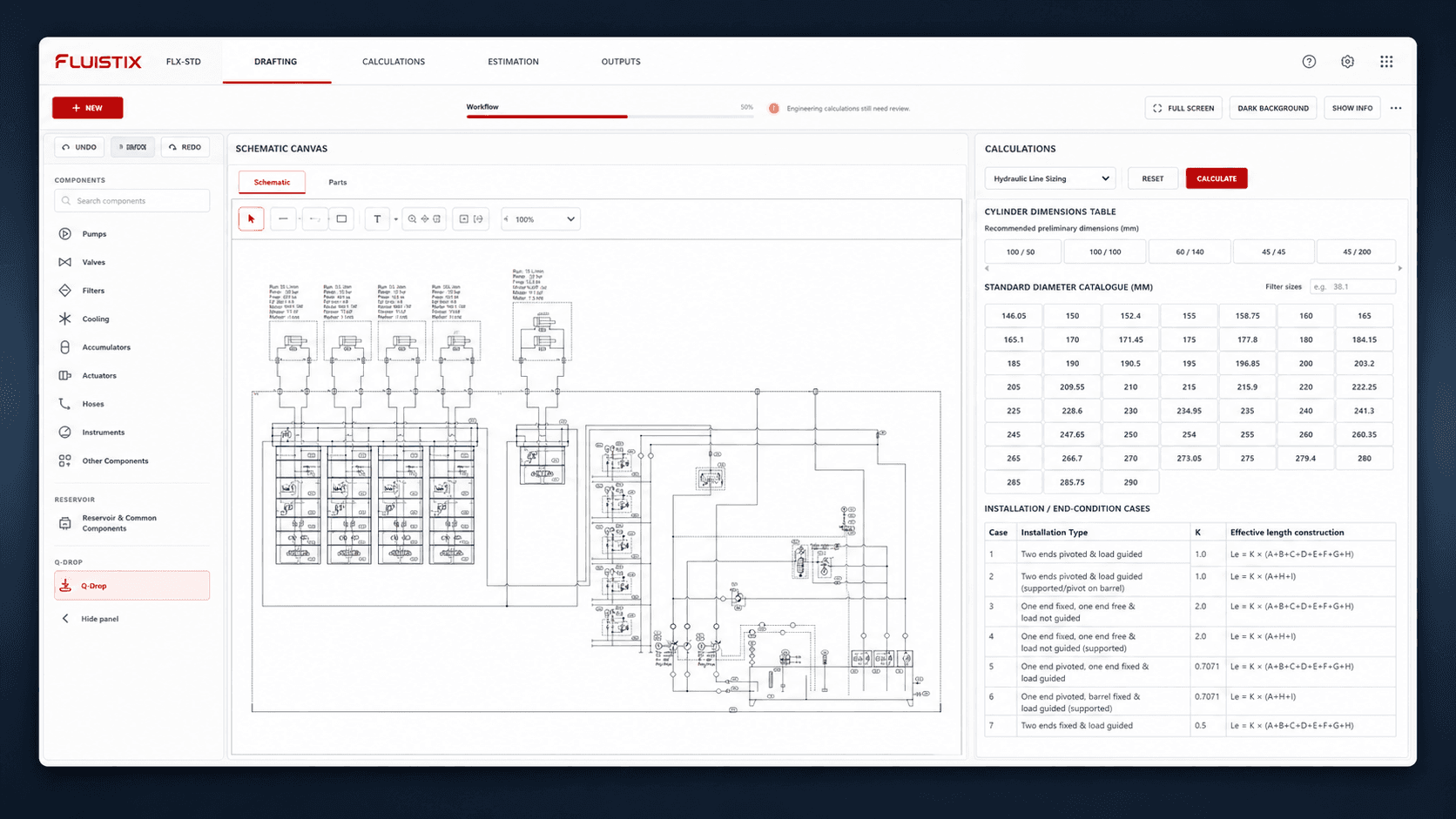
Current product demonstration
From configuration to reviewed output
Explore five real FLX-STD views showing how a standard open-loop HPU moves through the engineering workflow.
Current FLX-STD interface
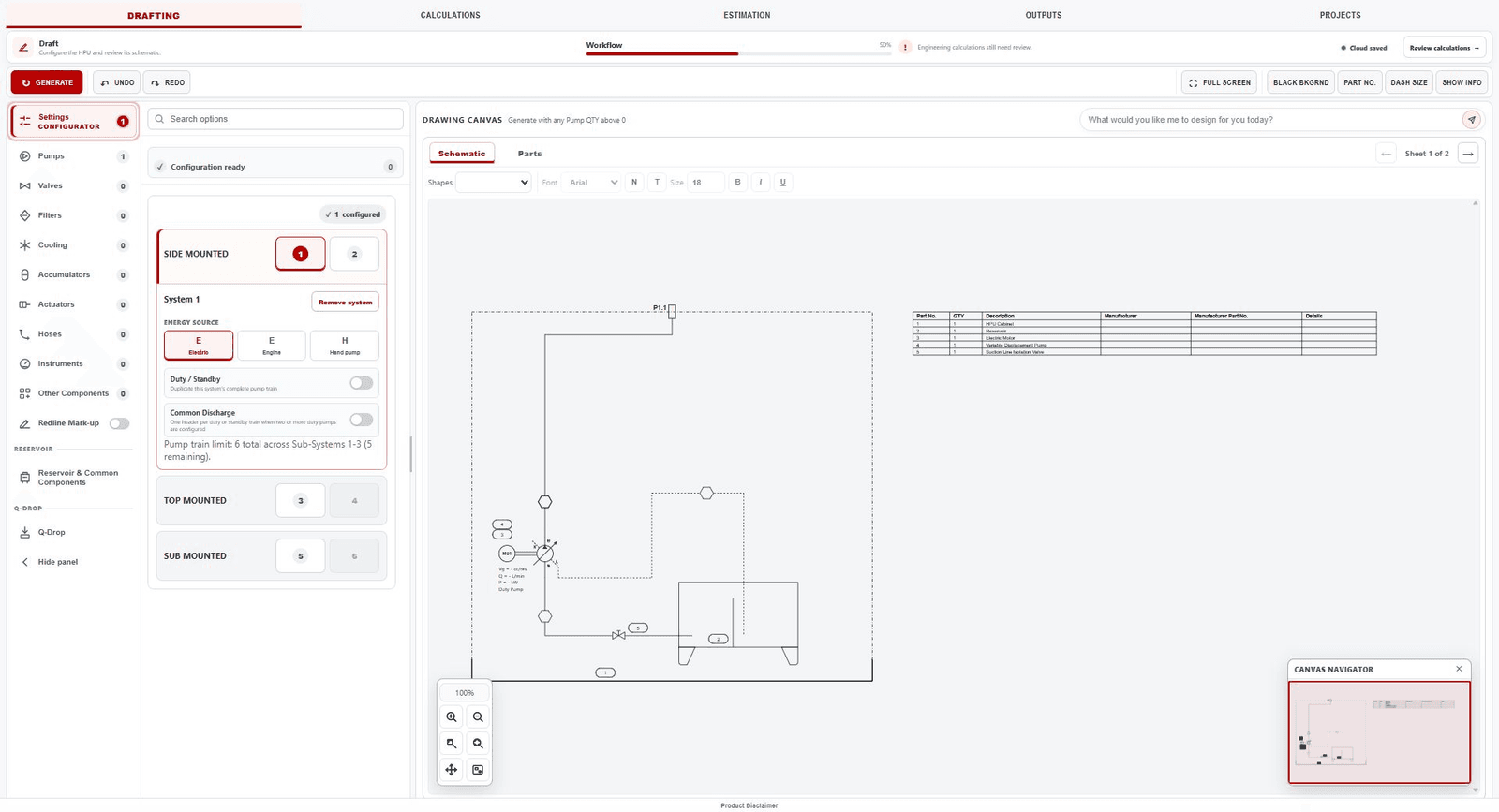
Step 1
Configure
Set the HPU arrangement, pump train and component options with structured inputs.
FLX-STD supports the workflow; the engineer remains responsible for reviewing and approving calculations, schematics and outputs.
Designed for engineering speed
Spend less time rebuilding information between engineering steps.
FLUISTIX keeps the design workflow connected, helping engineers move from an HPU concept to a review-ready schematic, calculations, estimate and output without losing project context.
1.Configure
2.Generate schematic
3.Calculate
4.Estimate
5.Export
Generate and inspect the schematic without rebuilding the project context
Review calculations and prepare the estimate from the same design workflow
Prepare controlled engineering outputs and DXF documentation from the reviewed project
Product versions
Choose the capability level that fits your workflow.
FLX-STD is available now. FLX-PRO and FLX-PRO+ show the planned product roadmap and are not yet available to purchase.
FLUISTIX Standard
Available now
The current FLUISTIX version for standard open-loop HPU workflows.
Open Loop
Standard Calculations
User Part LibraryComing soon
Manual Estimations
Basic AI AssistantComing soon
FLUISTIX PRO
Not available yet
A planned expansion for broader hydraulic system workflows.
Everything in Standard
Limited Closed Loop
Open Loop+
Manufacturer Library
Advanced Open Loop Calculations
Advanced AI Assistant
Automated Estimations
FLUISTIX PRO+
Not available yet
The planned advanced tier for complex hydraulic workflows.
Everything in PRO
Advanced Closed Loop
Advanced Closed Loop Calculations
Pricing
One plan. Three billing periods.
Use the complete FLX-STD workflow with monthly flexibility or longer-term savings. All prices are in AUD.
FLX-STD subscription
FLUISTIX Standard
AUD 179.00/ month
Monthly equivalent on every month billing
- Term discount
- 0%
- You save
- AUD 0.00
Billed monthly at AUD 179.00.
This full amount is charged after the 7-day trial and again at each selected billing interval unless cancelled.
Review monthly billing
All prices are in AUD. Taxes calculated at checkout where applicable. Card required.
7-day free trial
Taxes calculated at checkout where applicable
Discounts do not combine
Secure Stripe billing portal
Engineering focus
A transparent, engineer-controlled workflow
FLUISTIX helps organise repeatable design tasks while keeping calculation, schematic and output approval with the engineer.
Real product workflow
The product demonstration uses the current FLX-STD interface and follows a complete configuration-to-output sequence.
Engineering review stays visible
Calculations, schematic state, redlines and outputs remain part of the review process rather than being hidden behind automation.
Clear trial and billing
The trial, full selected-term charge, renewal interval, applicable tax treatment and cancellation path are explained before checkout.
Account and support controls
Customers can manage account access and billing, use public guidance and contact the FLUISTIX team when help is needed.
Need to confirm fit before starting a trial?
FAQ
Questions engineers ask first.
What is FLUISTIX FLX-STD?
FLX-STD is the current standard version of FLUISTIX for standard open-loop HPU schematic generation, calculations, review, outputs, and AI-assisted drafting.
What type of hydraulic systems does it support?
FLX-STD focuses on standard open-loop hydraulic power unit schematic generation and related review workflows.
What is included in the FLX-STD workflow?
FLX-STD includes structured open-loop HPU configuration, schematic generation, calculation review, Q-Drop / Quick Draw tools, redline review, project saving and DXF output preparation.
How does the free trial work?
Create an account, choose monthly, annual or two-year billing, review the subscription in Stripe and add a valid payment method. You are not charged during the seven-day trial. Unless cancelled first, Stripe charges the full selected-term amount after the trial and the subscription renews at that interval.
How do I cancel?
Open your FLUISTIX account and use the secure billing portal to manage or cancel the subscription. Your account shows the access period that remains after cancellation.
Can FLUISTIX export DXF files?
Yes. FLX-STD includes DXF output workflow support for engineering documentation preparation.
Can I manually refine a schematic?
Q-Drop / Quick Draw and redline tools support manual additions and review communication within the available FLX-STD symbol and mark-up workflow.
Does FLUISTIX replace engineering review?
No. FLUISTIX supports schematic generation and review workflows, but engineering review and approval remain the responsibility of the user.
How can I contact FLUISTIX?
You can contact FLUISTIX by emailing info@fluistix.com.
See whether FLX-STD fits your open-loop HPU workflow.
Explore the complete configuration, drafting, calculation review, mark-up and DXF output workflow for seven days.
Have a workflow or licensing question? Contact info@fluistix.com.